결과물
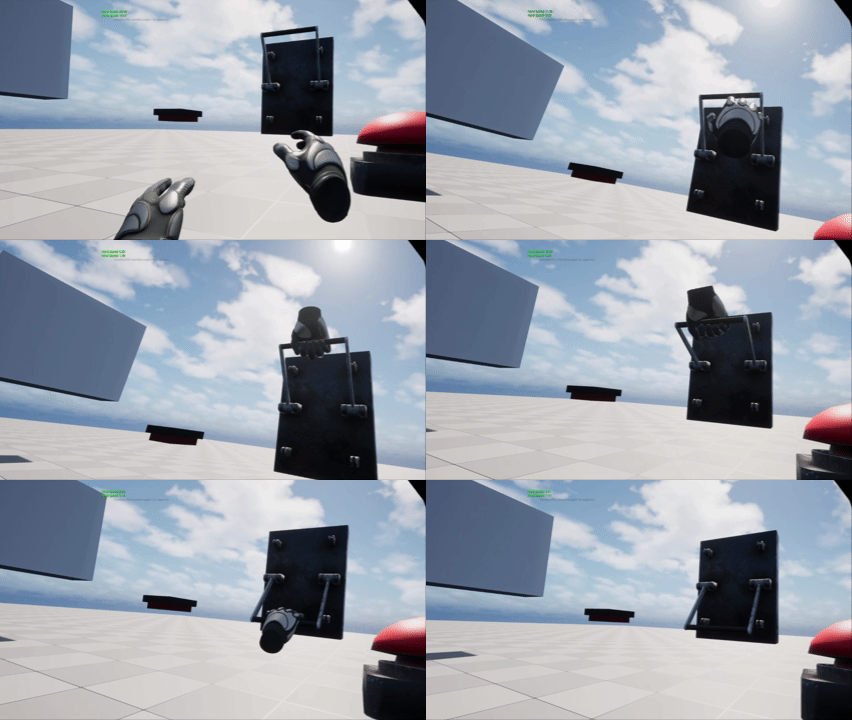
레버와 상호작용 시 손잡이에 손 메시가 부착이 되면서 Motion Controller의 위치에 따라 레버를 내리고 올릴 수 있게 구현했습니다. (컴퓨터 성능 탓에 렉이 걸리네요 ..)
구현 내용
1. ALever.h / .cpp
Tick 기반으로 동작을 합니다. 그랩 상태 / 리턴 상태 / 락 상태 3가지로 구분을 했는데요. 그랩 상태에서는 Motion Controller의 위치에 따라 레버의 위치가 보간되도록 했습니다. 리턴 상태는 그랩 상태에서 레버를 끝까지 당기지 못 했을 때 전이되는 상태입니다. 리턴 상태에서는 레버가 원래의 위치로 보간되도록 구현했습니다. 락 상태는 레버를 끝까지 당겼을 때 전이되는 상태로써, LockDuration 동안 그랩이 불가하고, LockDuration이 지나면 원래의 위치로 빠르게 보간됩니다.
추가로 Haptic Feedback을 적용해봤습니다. 그랩 상태에서 레버의 위치에 따라 진동의 빈도, 세기가 점차 세게 전달이 되도록 구현했습니다. 레버를 끝까지 당긴 경우 0.3초간 강한 진동이 전달되면서 레버를 끝까지 내린 느낌을 줍니다.
ALever.h
더보기
#pragma once

#include "CoreMinimal.h"
#include "Actor/Grabbable/VRGrabbableActor.h"
#include "Lever.generated.h"

class AVRHand;

UCLASS()
class VIRTUALREALITY_API ALever : public AVRGrabbableActor
{
	GENERATED_BODY()


// Lifecycle Section
public:
	ALever();
	virtual void BeginPlay() override;
	virtual void Tick(float DeltaTime) override;


// IGrabbable Interface
public:
	virtual void OnGrab(USkeletalMeshComponent* InComponent, const FVector& GrabLocation) override;
	virtual void OnRelease(USkeletalMeshComponent* InComponent) override;


// Member Function
private:
	void UpdateLeverAngle(float DeltaTime);


// Component Section
protected:
	UPROPERTY(VisibleAnywhere, BlueprintReadOnly, Category = "변수|컴포넌트")
	TObjectPtr<USkeletalMeshComponent> LeverMesh;


// Grab Variable Section
protected:
	UPROPERTY(EditDefaultsOnly, BlueprintReadOnly, Category = "변수")
	float MinAngle = -60.f;

	UPROPERTY(EditDefaultsOnly, BlueprintReadOnly, Category = "변수")
	float MaxAngle = 60.f;

	/** 최대 각도에 도달하기 위해 컨트롤러를 이동해야 하는 거리(cm)입니다. */
	UPROPERTY(EditDefaultsOnly, BlueprintReadOnly, Category = "변수")
	float MappingRange = 20.f;

	UPROPERTY(EditDefaultsOnly, BlueprintReadOnly, Category = "변수")
	float ControlInterpSpeed = 8.f;

	UPROPERTY(EditDefaultsOnly, BlueprintReadOnly, Category = "변수")
	float LockDuration = 5.f;

	UPROPERTY(EditDefaultsOnly, BlueprintReadOnly, Category = "변수")
	float ReturnInterpSpeed = 10.f;

	UPROPERTY(VisibleAnywhere, BlueprintReadOnly, Category = "변수|소켓")
	FName GrabSocketName = FName(TEXT("GrabSocket"));


// Haptic Feedback Section
	UPROPERTY(EditDefaultsOnly, BlueprintReadOnly, Category = "변수")
	float PullHapticFrequency = 0.4f;

	UPROPERTY(EditDefaultsOnly, BlueprintReadOnly, Category = "변수")
	float PullHapticMaxAmplitude = 0.4f;

	UPROPERTY(EditDefaultsOnly, BlueprintReadOnly, Category = "변수")
	float MinAngleHapticFrequency = 1.0f;

	UPROPERTY(EditDefaultsOnly, BlueprintReadOnly, Category = "변수")
	float MinAngleHapticAmplitude = 1.0f;

	UPROPERTY(EditDefaultsOnly, BlueprintReadOnly, Category = "변수")
	float MinAngleHapticDuration = 0.3f;


// Cached Section
private:
	UPROPERTY()
	TObjectPtr<AVRHand> CachedHand;

	float GrabStartControllerZ = 0.f;
	float GrabStartAngle = 0.f;
	float CurrentAngle = 0.f;
	float LockTimer = 0.f;


// Flag Section
	uint8 bReachedMinAngle : 1 = false;
	uint8 bIsLocked : 1 = false;
	uint8 bIsReturning : 1 = false;


// Getter, Setter Section
public:
	FORCEINLINE float GetCurrentAngle() const { return CurrentAngle; }

};
ALever.cpp
더보기
#include "Lever.h"
#include "VirtualReality.h"
#include "Component/VRHapticComponent.h"
#include "Components/BoxComponent.h"
#include "Player/VRHand.h"

ALever::ALever()
{
	PrimaryActorTick.bCanEverTick = true;

	LeverMesh = CreateDefaultSubobject<USkeletalMeshComponent>("LeverMesh");
	LeverMesh->SetupAttachment(Mesh);

	GrabRegion->SetupAttachment(LeverMesh);
	GrabRegion->SetRelativeLocation(FVector(0.0f, -14.0f, 0.0f));
	GrabRegion->SetBoxExtent(FVector(16.0f, 16.0f, 8.0f));

	GrabbableType = EGrabbableType::Lever;
}

void ALever::BeginPlay()
{
	Super::BeginPlay();

	CurrentAngle = GetActorRotation().Roll;
}

void ALever::Tick(float DeltaTime)
{
	Super::Tick(DeltaTime);

	// ----- Lock State -----
	if (bIsLocked)
	{
		LockTimer += DeltaTime;
		if (LockTimer >= LockDuration)
		{
			bIsLocked = false;
			bIsReturning = true;
		}
		return;
	}


	// ----- Returning State -----
	if (bIsReturning)
	{
		CurrentAngle = FMath::FInterpTo(CurrentAngle, MaxAngle, DeltaTime, ReturnInterpSpeed);
		LeverMesh->SetRelativeRotation(FRotator(0.f, 0.f, CurrentAngle));
		if (FMath::IsNearlyEqual(CurrentAngle, MaxAngle, 1.0f))
		{
			bIsReturning = false;
		}
		return;
	}


	// ----- Normal State -----
	if (bIsHeld)
	{
		// 레버를 잡고 있는 동안 컨트롤러 위치를 기반으로 각도를 업데이트합니다.
		UpdateLeverAngle(DeltaTime);
	}
	else
	{
		// 레버를 놓은 후 MinAngle에 도달하지 못했다면 MaxAngle로 복귀합니다.
		CurrentAngle = FMath::FInterpTo(CurrentAngle, MaxAngle, DeltaTime, ControlInterpSpeed);
		LeverMesh->SetRelativeRotation(FRotator(0.f, 0.f, CurrentAngle));
	}
}

void ALever::OnGrab(USkeletalMeshComponent* InComponent, const FVector& GrabLocation)
{
	Super::OnGrab(InComponent, GrabLocation);

	// Grab 시점의 컨트롤러 위치와 레버 각도를 캐시합니다.
	CachedHand = Cast<AVRHand>(InComponent->GetOwner());
	if (CachedHand)
	{
		GrabStartControllerZ = CachedHand->GetMotionControllerLocation().Z;
	}
	GrabStartAngle = CurrentAngle;
	bIsHeld = true;
	bReachedMinAngle = false;

	// 손 컴포넌트를 레버의 GrabSocket에 부착합니다.
	InComponent->SetAllBodiesSimulatePhysics(false);
	InComponent->AttachToComponent(LeverMesh, FAttachmentTransformRules::SnapToTargetNotIncludingScale, GrabSocketName);
}

void ALever::OnRelease(USkeletalMeshComponent* InComponent)
{
	Super::OnRelease(InComponent);

	bIsHeld = false;

	// 햅틱을 즉시 중지합니다.
	if (CachedHand)
	{
		CachedHand->GetHapticComponent()->StopHaptic();
	}

	CachedHand = nullptr;

	// 손 컴포넌트를 레버에서 분리합니다.
	InComponent->DetachFromComponent(FDetachmentTransformRules::KeepWorldTransform);
	InComponent->SetAllBodiesSimulatePhysics(true);
}

void ALever::UpdateLeverAngle(float DeltaTime)
{
	if (!CachedHand) return;

	// 컨트롤러가 Grab 시점 대비 얼마나 이동했는지 계산합니다.
	float DeltaZ = CachedHand->GetMotionControllerLocation().Z - GrabStartControllerZ;

	// Delta Z를 각도로 변환합니다. (아래로 내리면 음수 → MinAngle 방향)
	float DeltaAngle = (DeltaZ / MappingRange) * (MaxAngle - MinAngle) * 0.5f;
	float TargetAngle = FMath::Clamp(GrabStartAngle + DeltaAngle, MinAngle, MaxAngle);

	// InterpSpeed가 낮을수록 무거운 느낌을 줍니다.
	CurrentAngle = FMath::FInterpTo(CurrentAngle, TargetAngle, DeltaTime, ControlInterpSpeed);
	LeverMesh->SetRelativeRotation(FRotator(0.0f, 0.f, CurrentAngle));

	// 당기는 정도에 비례하여 연속 햅틱을 재생합니다. (0=MaxAngle, 1=MinAngle)
	float PullRatio = FMath::Clamp((CurrentAngle - MaxAngle) / (MinAngle - MaxAngle), 0.f, 1.f);
	CachedHand->GetHapticComponent()->PlayHaptic(PullHapticFrequency, PullRatio * PullHapticMaxAmplitude);

	// MinAngle에 처음 도달했을 때 잠금을 시작하고 강한 햅틱을 재생합니다.
	if (!bReachedMinAngle && FMath::IsNearlyEqual(CurrentAngle, MinAngle, 10.0f))
	{
		bReachedMinAngle = true;
		bIsLocked = true;
		LockTimer = 0.f;
		CachedHand->GetHapticComponent()->PlayHapticBurst(
			MinAngleHapticFrequency, MinAngleHapticAmplitude, MinAngleHapticDuration);
	}
}
2. UVRHapticComponent.h / .cpp
상호작용에 따라 Haptic Feedback을 전달하면서 몰입도를 높이고자 합니다. 따라서, VRHand는 VRHapticComponent를 소유함으로 진동 기능을 활용합니다.
UVRHapticComponent.h
더보기
#pragma once

#include "CoreMinimal.h"
#include "Components/ActorComponent.h"
#include "GenericPlatform/GenericPlatformInputDeviceMapper.h"
#include "VRHapticComponent.generated.h"

UCLASS(ClassGroup=(Custom), meta=(BlueprintSpawnableComponent))
class VIRTUALREALITY_API UVRHapticComponent : public UActorComponent
{
	GENERATED_BODY()


// Lifecycle Section
public:
	UVRHapticComponent();


// Member Function
public:
	/** 어느 손에 햅틱을 재생할지 초기화합니다. VRHand의 BeginPlay에서 호출합니다. */
	void Initialize(EControllerHand InHandType);

	/** 연속 햅틱을 재생합니다. (매 Tick 호출 가능) */
	void PlayHaptic(float Frequency, float Amplitude);

	/** 지정한 시간 동안 햅틱을 재생한 뒤 자동으로 중지합니다. */
	void PlayHapticBurst(float Frequency, float Amplitude, float Duration);

	/** 햅틱을 즉시 중지합니다. */
	void StopHaptic();


// Variable Section
private:
	EControllerHand HandType = EControllerHand::Right;
	FTimerHandle BurstTimerHandle;

};
UVRHapticComponent.cpp
더보기
#include "VRHapticComponent.h"
#include "VirtualReality.h"
#include "GameFramework/PlayerController.h"

UVRHapticComponent::UVRHapticComponent()
{
	PrimaryComponentTick.bCanEverTick = false;
}

void UVRHapticComponent::Initialize(EControllerHand InHandType)
{
	HandType = InHandType;
}

void UVRHapticComponent::PlayHaptic(float Frequency, float Amplitude)
{
	APlayerController* PC = GetWorld()->GetFirstPlayerController();
	if (!PC) return;

	PC->SetHapticsByValue(Frequency, Amplitude, HandType);
}

void UVRHapticComponent::PlayHapticBurst(float Frequency, float Amplitude, float Duration)
{
	APlayerController* PC = GetWorld()->GetFirstPlayerController();
	if (!PC) return;

	// 이전 버스트 타이머가 남아있다면 취소합니다.
	GetWorld()->GetTimerManager().ClearTimer(BurstTimerHandle);

	PC->SetHapticsByValue(Frequency, Amplitude, HandType);

	// Duration 이후 자동으로 햅틱을 중지합니다.
	GetWorld()->GetTimerManager().SetTimer(
		BurstTimerHandle, this, &UVRHapticComponent::StopHaptic, Duration, false);
}

void UVRHapticComponent::StopHaptic()
{
	GetWorld()->GetTimerManager().ClearTimer(BurstTimerHandle);

	APlayerController* PC = GetWorld()->GetFirstPlayerController();
	if (!PC) return;

	PC->SetHapticsByValue(0.f, 0.f, HandType);
}
마무리
VR 플랫폼이 확실히 몰입도가 높긴 한 것 같아요. 하드웨어의 성능이 좋아져서 PC에서의 성능을 그대로 발휘하는 날이 온다면 점차 게임 산업도 VR 쪽으로 기울지 않을까 하는 생각도 들었네요. 물론 VR 멀미, 하드웨어 비용 등 고려할게 많긴 하지만, VR의 고점이 높은 건 확실한 것 같습니다.
'Unreal Engine 프로젝트 > VR 공포게임' 카테고리의 다른 글
| [언리얼엔진] 6. VR Hand 애니메이션 제작 (0) | 2026.04.09 |
|---|---|
| [언리얼엔진] 5. VR 최적화 (0) | 2026.04.09 |
| [언리얼엔진] 3. VR Hand 물리 효과 구현 (0) | 2026.04.04 |
| [언리얼엔진] 2. VR 버튼 구현 (0) | 2026.04.04 |
| [언리얼엔진] 1. VR Grab/Release 기능 구현 (C++) (0) | 2026.04.04 |