결과물
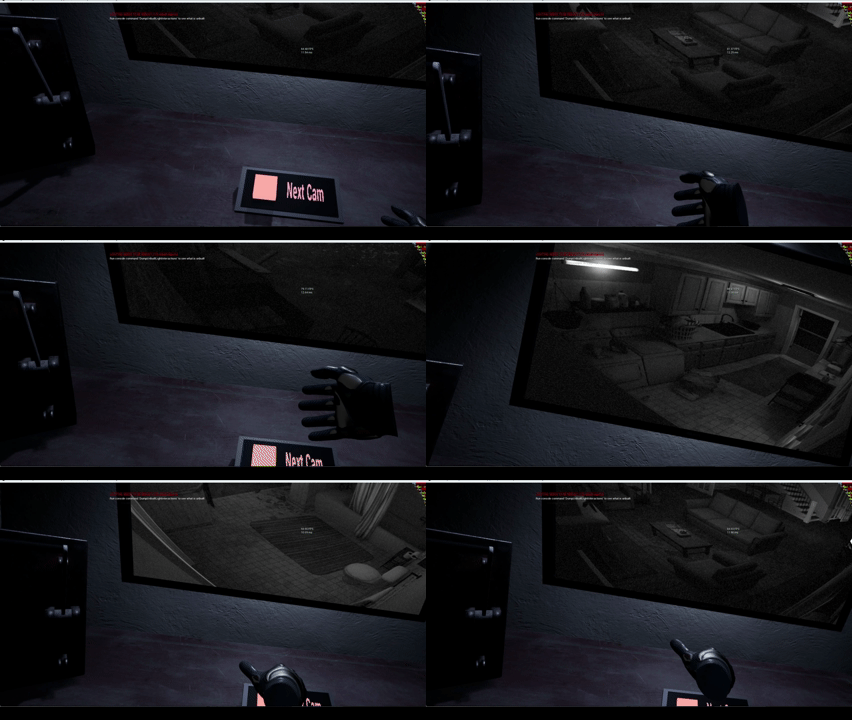
버튼을 누르면 햅틱 진동과 함께 모니터의 채널이 다음으로 넘어갑니다.
구현 내용
1. AChannelSwitchButton.h / .cpp
버튼을 누르면 Monitor의 SwitchToNextCCTV 함수를 호출해서 다음 채널로 넘어가도록 구현했습니다.
AChannelSwitchButton.h
더보기
#pragma once

#include "CoreMinimal.h"
#include "Actor/Triggerable/TriggerableActor.h"
#include "Interface/Sequenceable.h"
#include "ChannelSwitchButton.generated.h"

class AMonitor;
class UTextRenderComponent;

UCLASS()
class VIRTUALREALITY_API AChannelSwitchButton : public ATriggerableActor, public ISequenceable
{
	GENERATED_BODY()

// Lifecycle Function Section
public:
	AChannelSwitchButton();
	virtual void BeginPlay() override;


// Member Function
protected:
	virtual void OnTriggered() override;
	void SwitchChannel();


//	ISequenceable Interface
protected:
	virtual void OnSequenceStarted() override;
	virtual void OnSequenceEnded() override;


// Component Section
protected:
	UPROPERTY(VisibleAnywhere, BlueprintReadOnly, Category = "변수|컴포넌트")
	TObjectPtr<UStaticMeshComponent> ButtonMesh;


// Variable Section
private:
	FTimerHandle ChannelSwitchTimerHandle;


// Cached Section
private:
	UPROPERTY()
	TObjectPtr<AMonitor> Monitor;

};
AChannelSwitchButton.cpp
더보기
#include "ChannelSwitchButton.h"
#include "VirtualReality.h"
#include "Actor/Monitor.h"
#include "Components/BoxComponent.h"
#include "Kismet/GameplayStatics.h"

AChannelSwitchButton::AChannelSwitchButton()
{
	// ButtonMesh를 초기화합니다.
	ButtonMesh = CreateDefaultSubobject<UStaticMeshComponent>("ButtonMesh");
	ButtonMesh->SetupAttachment(Mesh);

	// BoxComponent를 ButtonMesh에 부착합니다.
	TriggerRegion->SetupAttachment(ButtonMesh);
}

void AChannelSwitchButton::BeginPlay()
{
	Super::BeginPlay();

	Monitor = Cast<AMonitor>(UGameplayStatics::GetActorOfClass(GetWorld(), AMonitor::StaticClass()));
}

void AChannelSwitchButton::OnTriggered()
{
	Super::OnTriggered();

	GetWorldTimerManager().SetTimer(ChannelSwitchTimerHandle, this, &ThisClass::SwitchChannel, 0.2f, false);
	PlaySequence();
}

void AChannelSwitchButton::SwitchChannel()
{
	Monitor->SwitchToNextCCTV();
}

void AChannelSwitchButton::OnSequenceStarted()
{
	bIsTriggerEnabled = false;
}

void AChannelSwitchButton::OnSequenceEnded()
{
	bIsTriggerEnabled = true;
}
2. AVRActorBase.h
VRActor는 기본적으로 햅틱의 진동과 세기에 대한 변수를 지니도록 설계했습니다. 모든 VRActor는 상호작용 수행 시 햅틱 피드백을 통해 상호작용이 이루어졌음을 사용자에게 알립니다.
VRActorBase.h
더보기
#pragma once

#include "CoreMinimal.h"
#include "GameFramework/Actor.h"
#include "VRActorBase.generated.h"

UCLASS()
class VIRTUALREALITY_API AVRActorBase : public AActor
{
	GENERATED_BODY()


// Lifecycle Section
public:
	AVRActorBase();


// Component Section
protected:
	UPROPERTY(VisibleAnywhere, BlueprintReadOnly, Category = "변수|컴포넌트")
	TObjectPtr<USceneComponent> Root;

	UPROPERTY(VisibleAnywhere, BlueprintReadOnly, Category = "변수|컴포넌트")
	TObjectPtr<UStaticMeshComponent> Mesh;


// Haptic Feedback Section
protected:
	UPROPERTY(EditDefaultsOnly, BlueprintReadOnly, Category = "변수")
	float BurstHapticFrequency = 1.0f;

	UPROPERTY(EditDefaultsOnly, BlueprintReadOnly, Category = "변수")
	float BurstHapticAmplitude = 1.0f;

	UPROPERTY(EditDefaultsOnly, BlueprintReadOnly, Category = "변수")
	float BurstHapticDuration = 0.3f;

};
3. ATriggerableActor.h / .cpp
TriggerableActor의 Trigger Collision에 닿았을 경우 햅틱 피드백을 발생시키도록 구현했습니다.
ATriggerableActor.h
더보기
#pragma once

#include "CoreMinimal.h"
#include "Actor/VRActorBase.h"
#include "TriggerableActor.generated.h"

class AVRHand;
class UBoxComponent;

UCLASS()
class VIRTUALREALITY_API ATriggerableActor : public AVRActorBase
{
	GENERATED_BODY()

public:
	ATriggerableActor();
	virtual void BeginPlay() override;

protected:
	/** 트리거가 발동될 때 호출되는 함수입니다. */
	virtual void OnTriggered();

private:
	UFUNCTION()
	void OnOverlapBegin(UPrimitiveComponent* OverlappedComp, AActor* OtherActor, UPrimitiveComponent* OtherComp, int32 OtherBodyIndex, bool bFromSweep, const FHitResult& SweepResult);

protected:
	UPROPERTY(VisibleAnywhere, BlueprintReadOnly, Category = "변수|컴포넌트")
	TObjectPtr<UBoxComponent> TriggerRegion;

	UPROPERTY(EditDefaultsOnly, BlueprintReadOnly, Category = "변수|수치")
	float TriggerSpeedThreshold;

	UPROPERTY(VisibleAnywhere, BlueprintReadOnly, Category = "변수|상태")
	uint8 bIsTriggerEnabled : 1 = true;

private:
	UPROPERTY(VisibleAnywhere)
	TObjectPtr<AVRHand> CachedHand;

};
ATriggeraableActor.cpp
더보기
#include "VRGrabbableActor.h"
#include "Components/BoxComponent.h"
#include "Player/VRHand.h"
#include "Component/VRHapticComponent.h"

AVRGrabbableActor::AVRGrabbableActor()
{
	GrabRegion = CreateDefaultSubobject<UBoxComponent>(TEXT("GrabBoxRegion"));
	GrabRegion->SetupAttachment(Mesh);
	GrabRegion->SetCollisionProfileName(TEXT("Grabbable"));
}

void AVRGrabbableActor::OnGrab(USkeletalMeshComponent* InComponent, const FVector& GrabLocation)
{
	CachedHand = Cast<AVRHand>(InComponent->GetOwner());
	if (CachedHand)
	{
		CachedHand->GetHapticComponent()->PlayHaptic(GrabHapticFrequency, GrabHapticAmplitude);
	}
}

void AVRGrabbableActor::OnRelease(USkeletalMeshComponent* InComponent)
{
	if (CachedHand)
	{
		CachedHand->GetHapticComponent()->StopHaptic();
	}

	CachedHand = nullptr;
}
마무리
점점 게임의 구색이 갖춰지는 느낌이라 뿌듯합니다. JumpScare 이벤트도 추가하고, 사운드도 추가하게 되면 몰입도가 점점 높아질 것 같습니다 ㅎㅎ
'Unreal Engine 프로젝트 > VR 공포게임' 카테고리의 다른 글
| [언리얼엔진] 10. 레버 중간 클래스 구현 및 오브젝트 모델링 (0) | 2026.04.10 |
|---|---|
| [언리얼엔진] 9. Floating Dust 파티클 구현 (0) | 2026.04.09 |
| [언리얼엔진] 7. CCTV 기능 구현 (0) | 2026.04.09 |
| [언리얼엔진] 6. VR Hand 애니메이션 제작 (0) | 2026.04.09 |
| [언리얼엔진] 5. VR 최적화 (0) | 2026.04.09 |